Upset bolts are installed on the side of poles to support neutral conductors and secondary service wires. Assembly Creator's Components tab is where you view, create, edit, and delete upset bolts. Expand the Bracket Hardware category on the left pane, if necessary, and select the Upset Bolt subcategory. This populates the middle pane with a list of available upset bolts. The right pane provides details for the currently selected bolt.
 |
The results of creating, deleting, or editing components are not permanently saved until you select File > Save from the main menu. |
Create
Follow these steps to create upset bolts in a scenario:
- To create new upset bolts, click the
 button. This opens the Create Upset Bolt form.
 - Enter the desired values for each field (fields are defined at the end of this topic).
- Click Create to add the new bolt to the component list.
- Selecting File > Save will output the XML file for the upset bolt to your Miner and Miner/ArcFM Solution/Bin directory in a folder named Brackets.
Edit
Follow these steps to edit an upset bolt:
- Double-click the bolt you want to edit. This opens the bolt's edit form.
- Enter the desired values for each field (fields are defined at the end of this topic).
- Click the appropriate button:
- Delete - delete the bolt from the component list.
- Update - apply edits to the bolt.
- Cancel - exit the form without making changes to the bolt.
Delete
There are two ways to delete upset bolts:
- Click the red X next to the bolt to delete from the list in the middle pane of the Components tab.
- Double-click the bolt to open the edit form. Click Delete.
 |
An asterisks after "Assembly Creator" in the title bar denotes unsaved changes. If you close Assembly Creator without saving, a popup window will alert you that unsaved changes exist. |
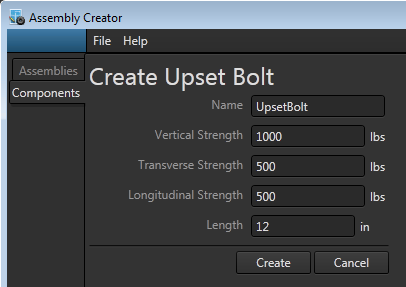
Create Upset Bolt form.
Specifications
In Assembly Creator, upset bolts are defined with five parameters: Name, Vertical Strength, Transverse Strength, Longitudinal Strength, and Length.
Name
Unique identifier for the upset bolt. If you attempt to create an upset bolt with a name that already exists, a popup will warn of the issue when you click Create. You must provide a unique name before Assembly Creator will create the bolt.
Vertical Strength
The amount of upward or downward force the bracket can withstand before failing.
Transverse Strength
The maximum force directed towards or away from the pole that the component can withstand before failing.
Longitudinal Strength
The maximum force directed perpendicular to the pole that the component can withstand before failing.
Length
The length of the bracket from the surface of the pole to the insulator attachment point.
|
Any values you enter that are out of the acceptable range for that item will be outlined in red. Hover the cursor over the caution triangle to see the range of acceptable values. 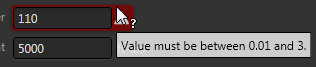
|
