Configuring Responder
Responder Services Login
Version: 10.2.1d and 10.2.1d SP3 |
| Responder Overview > Implement Responder > Configure Responder > Responder Server > Responder Windows Service > Responder Services Login |
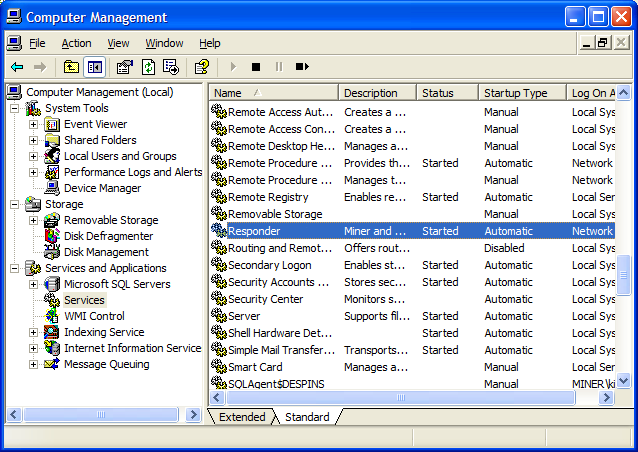
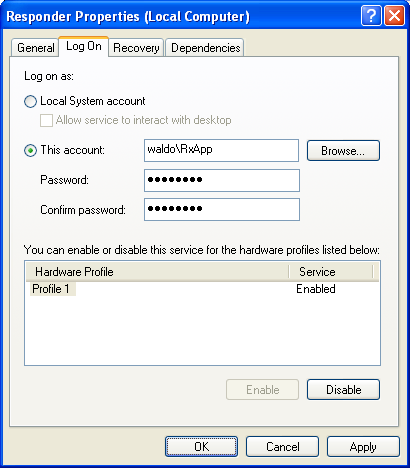
A specific login name is used when executing the Responder Windows Service. This login name used to execute the Responder Windows Service is determined in the Computer Management window (steps shown below). This login defaults to the user you specify while installing Responder server. However, you may change it using the steps below.
Licensing: If you have Responder Server and Client installed on the same machine and the Responder Services user differs from the client's login user, two ArcGIS licenses will be checked out when a user logs on to use ArcMap. This use of two ArcGIS licenses can be avoided by changing the Responder Services login to the Responder client's user login.
Windows Server 2003: If your Responder server is a Windows Server 2003 machine, the Responder Services user must be added to the Performance Monitor Users group.
To modify the Responder Service login or see to which user name it is set, follow the instructions below.
If you change the Responder Services login, you must delete all message queues associated with that user. This allows you to avoid MSMQ permissions issues. To do this, follow the steps below:
 |
The Purge Queues.bat file allows you to remove all messages in the existing queues. It will not delete the queues. |