The Overhead Design Analysis (OHDA) tool is preset with several types of cables. You have the option of using these cables or creating your own.
 |
Regardless of the types of cables used, OHDA will default to the cable with the smallest outer diameter specification. This is the sparrow cable for the default set. |
Associating Exported Cables from ArcMap
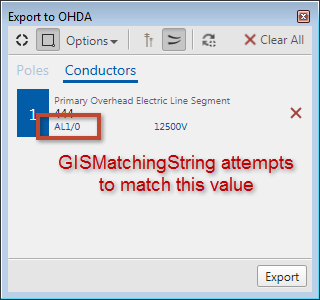
Figure 1, GISMatchingString tag attempts to match Cables identifier
If you want to export cables from ArcMap, you will first need to create an XML file to represent those cables in OHDA.
The <GISMatchingString> tag of the XML you create must match the conductor's label from the Export to OHDA window in ArcMap, as shown in Figure 1.
The label for neutral conductors is created by combining the Coded Values of the database's domains of Neutral Material and Neutral Size. For phased conductors, the domains of Conductor Material and Conductor Size are used.
OHDA queries the conductor's Phase Designation field to determine the number of cables to associate in the scenario. Because a neutral wire accompanies each set of conductors, a single phase will result in two conductors, a two phase will result in three conductors, and a three phase will produce four conductors in OHDA. If the program cannot match the assemblies you export, then it will create assemblies labeled Placeholder in red with the proper amount of pins to accommodate each conductor. For any specifications not found (i.e., voltage), OHDA will use a null value. You will need to replace all null values and Placeholder assemblies in a scenario with correct values and OHDA assemblies before you can calculate a scenario.
|
For detailed information on exporting to OHDA, see OHDA's Using Guide. |
Creating Custom Conductors, Service Drops, and Communication Cables
Follow these steps to create custom cables:
- Create a new file in a text editor like Notepad or an XML editor of your choice.
- Define your cables using the XML structure described below.
- Create a folder named CablesMasterXML in the Bin folder of the installation directory, the default being C:\Program Files (x86)\Miner and Miner\ArcFM Solution\Bin\CablesMasterXML on a 64-bit system.
- Save the XML file with a descriptive title. The filename is not important for OHDA to properly recognize the file.
- Create a separate file for each cable, saving all in the CablesMasterXML folder.
XML Structure for Conductors and Service Drops
| Tag | Description |
| <CableData> | Root element |
| <Header> | Defines the type of file |
| <Description> | Description of the cable visible in OHDA |
| <Name> | Name of cable. OHDA does not currently use this value |
| <CrossSectionalArea> | Surface area of cable at an end in square inches |
| <OuterDiameter> | Outer diameter of whole cable in inches |
| <WeightPerUnitLength> | Linear density of the wire in pounds per foot |
| <RatedBreakingStrength> | Rated breaking strength of the cable |
| <GISMatchingString> | (Conductors only) Identifies the value to match against when importing cables from ArcMap |
| <IsServiceDrop> | (Service Drops only) Include the value "true" (without quotes) within the tag to denote a Service Drop |
| <SpecUid> | GUID to identify the component |
| <OuterStrand> | Container element for outer strand tags |
| <ModulusOfElasticity> | The tensile elasticity of the cable's outer strand in psi |
| <ThermalExpansionCoeff> | The thermal expansion coefficient of the outer strand of the cable |
| <InitialCoefficient0>..<InitialCoefficient4> | Coefficient values used to measure stress versus strain for the outer strand immediately after being strung |
| <FinalCoefficient0>..<FinalCoefficient4> | Coefficient values used to measure stress versus strain for the outer strand after elongation over time |
| <CoreStrand> | Container element for core strand tags |
| <ModulusOfElasticity> | The tensile elasticity of the cable's core strand in psi |
| <ThermalExpansionCoeff> | The thermal expansion coefficient of the core strand of the cable |
| <InitialCoefficient0>..<InitialCoefficient4> | Coefficient values used to measure stress versus strain for the core strand immediately after being strung |
| <FinalCoefficient0>..<FinalCoefficient4> | Coefficient values used to measure stress versus strain for the core strand after elongation over time |
| <ReferenceTemperature> | The temperature at which the cable's specifications are determined in fahrenheit |
XML Structure for Communication Cables
| Tag | Description |
| <CommCableData> | Root element |
| <Header> | Defines the type of file |
| <Description> | Description of the cable visible in OHDA |
| <Name> | Name of cable - OHDA does not currently use this value |
| <SpecUid> | Assembly Creator creates and records a unique id for the cable. |
| <CrossSectionalArea> | Surface area of cable at an end in square inches |
| <OuterDiameter> | Outer diameter of whole cable in inches |
| <WeightPerUnitLength> | Linear density of the wire in pounds per foot |
|
The attributes in all OHDA configuration files are defined using imperial units. The metric setting in the user interface does not change this behavior. |
| Conductor Cable XML Example |
Copy Code
|
|---|---|
<?xml version="1.0" encoding="utf-8"?> <CableData> <Header>TYPE='CABLE FILE'</Header> <Description>556.5 kcmil 26/7 Strands</Description> <Name>DOVE ACSR</Name> <CrossSectionalArea>0.5083</CrossSectionalArea> <OuterDiameter>0.927</OuterDiameter> <WeightPerUnitlength>0.766</WeightPerUnitlength> <RatedBreakingStrength>22600</RatedBreakingStrength> <GISMatchingString>ACSR1/0</GISMatchingString> <SpecUid>12345678-1234-1234-1234-123456789100</SpecUid> <OuterStrand> <ModulusOfElasticity>68500</ModulusOfElasticity> <ThermalExpansionCoeff>0.00128</ThermalExpansionCoeff> <InitialCoefficient0>-882.9</InitialCoefficient0> <InitialCoefficient1>58787.6</InitialCoefficient1> <InitialCoefficient2>-60387.1</InitialCoefficient2> <InitialCoefficient3>6558</InitialCoefficient3> <InitialCoefficient4>16702</InitialCoefficient4> <FinalCoefficient0>-325.1</FinalCoefficient0> <FinalCoefficient1>24984.7</FinalCoefficient1> <FinalCoefficient2>-36576.1</FinalCoefficient2> <FinalCoefficient3>38037</FinalCoefficient3> <FinalCoefficient4>-14271</FinalCoefficient4> </OuterStrand> <CoreStrand> <ModulusOfElasticity>39575</ModulusOfElasticity> <ThermalExpansionCoeff>0.00064</ThermalExpansionCoeff> <InitialCoefficient0>-23.7</InitialCoefficient0> <InitialCoefficient1>40563.9</InitialCoefficient1> <InitialCoefficient2>-4404.6</InitialCoefficient2> <InitialCoefficient3>-15530</InitialCoefficient3> <InitialCoefficient4>6976</InitialCoefficient4> <FinalCoefficient0>139.1</FinalCoefficient0> <FinalCoefficient1>36329.4</FinalCoefficient1> <FinalCoefficient2>12925</FinalCoefficient2> <FinalCoefficient3>-67174</FinalCoefficient3> <FinalCoefficient4>44219</FinalCoefficient4> </CoreStrand> <ReferenceTemperature>75</ReferenceTemperature> </CableData> |
|
| Communication Cable XML Example |
Copy Code
|
|---|---|
<?xml version="1.0" encoding="utf-8"?> <CommCableData> <Header>TYPE='COMM CABLE FILE'</Header> <Description>Hybrid Single Jacket - 276 Fiber</Description> <Name>Stranded Loose Tube Hybrid (12 Fiber Units)</Name> <SpecUid>12345678-1234-1234-1234-123456789100<SpecUid> <CrossSectionalArea>0.4071</CrossSectionalArea> <OuterDiameter>0.720</OuterDiameter> <WeightPerUnitlength>0.123</WeightPerUnitlength> <!-- datasheet: http://docs.commscope.com/Public/SS%20D-XXX-LN-HY-FZZNS-XYXXX-NX22UTP.pdf --> </CommCableData> |
|
